Last Updated: April 2026 | Reviewed by Alex Hunter, Senior SaaS Editor
Zendesk Review 2026: The Gold Standard for Scalable CX?
Zendesk is the default answer when support becomes a real operation. The moment you move from “a couple of people answering emails” to a multi-team queue with SLAs, routing, QA, and reporting, Zendesk starts to make sense. It’s not the simplest helpdesk, and it’s not the cheapest. But it is one of the most proven foundations for scaling customer experience.
This review is written from an operator lens: what it feels like to run Zendesk week-to-week, what it unlocks when volume grows, and where teams get burned (complexity, cost, and “tool sprawl”).
Table of Contents
Quick Comparison: Zendesk vs Help Scout vs Intercom
| Tool | Best For | Complexity | Scaling | Tradeoff |
|---|---|---|---|---|
| Zendesk | Omnichannel support operations | High | Excellent | Admin overhead + cost |
| Help Scout | Email-first “human” support | Low | Good | Less enterprise control |
| Intercom | SaaS messaging + automation | Medium | Very good | Pricing complexity |
What Is Zendesk?
Zendesk is a customer service platform built around tickets. A ticket is a single record of a customer issue, regardless of where it came from (email, chat, social, web form). Zendesk’s job is to centralize those interactions, route them to the right people, and give managers visibility into performance.
What makes Zendesk different is not that it can “do support.” Almost every helpdesk can. Zendesk’s advantage is that it can do support when:
- you have multiple channels,
- multiple teams (support, billing, success, ops),
- different priorities (VIP vs free users),
- and you need consistency (SLAs, QA, reporting).
Omnichannel Ticketing (The Core Value)
Omnichannel is where Zendesk earns its name. The operational goal is simple: customers contact you wherever they want, and your team stays in one system. That matters because context is expensive. Every time an agent switches tools, you lose time and accuracy.
What omnichannel means in practice
- Single history: agents see past conversations across channels.
- Consistent routing: the right issues go to the right queue automatically.
- Unified reporting: you can measure performance without spreadsheets.
If you only do email support, Zendesk can feel like overkill. But once you add chat, a help center, and social DMs, “just use email” stops working fast.
Routing, Triggers, and Macros (Where Zendesk Saves Headcount)
Zendesk becomes powerful when you treat it like a routing engine. The core building blocks:
- Macros: reusable replies and actions (reply + tag + status change in one click).
- Triggers: “if this happens, do that” automation (e.g., tag and route based on keywords).
- Views: curated queues for teams (Billing, Bugs, VIP, Escalations).
A practical example workflow:
If ticket contains "refund" or "chargeback" → Tag: billing → Assign group: Billing
If customer plan = Enterprise → Tag: vip → Priority: High
If ticket language = Spanish → Assign to bilingual queue
This is where Zendesk can reduce headcount pressure. You’re not making agents faster by telling them to type quicker—you’re removing unnecessary decisions and handoffs.
Help Center / Knowledge Base
Zendesk’s help center becomes valuable once you have enough repetitive questions to justify a self-serve layer. The real win is deflection and support consistency:
- customers find answers without waiting,
- agents link to canonical docs instead of re-explaining policies,
- your product team gets signal from the top searched articles and failed searches.
For many companies, the help center is also the start of operational maturity: the moment you write “how it works” down, you stop relying on tribal knowledge.
Reporting & QA (The Manager Layer)
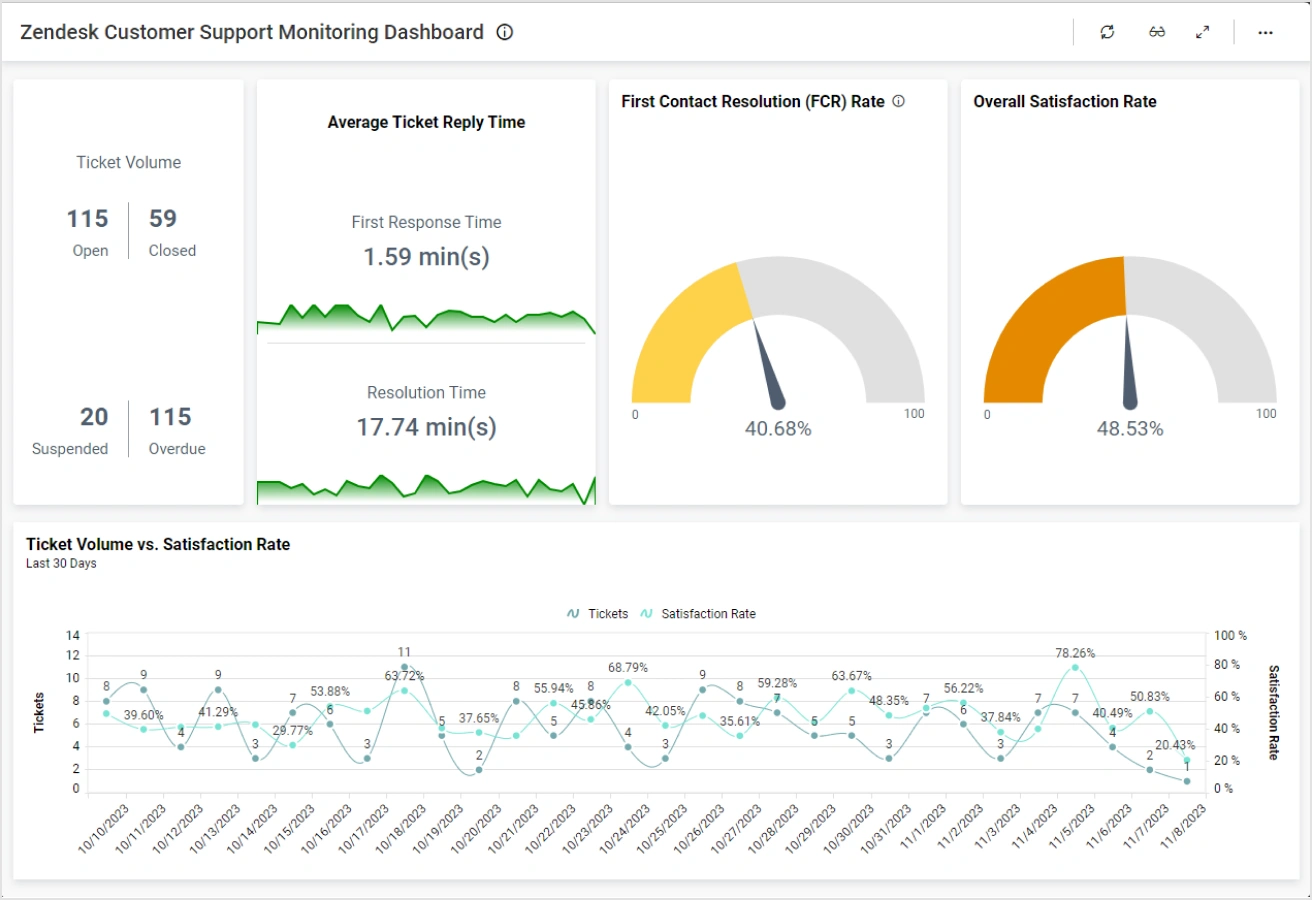
Zendesk is strong for managers because it can answer the questions that define support quality:
- Are we responding quickly? (first reply time, backlog)
- Are we resolving effectively? (time to solve, reopen rate)
- What’s driving volume? (top tags, categories, product areas)
That visibility matters when you scale. Without it, support becomes reactive: you only notice problems when customers complain publicly or churn quietly.
Admin Overhead: The Cost You Don’t See on the Pricing Page
Zendesk’s biggest downside is that it’s a real system to maintain. Once you set it up, someone must own:
- field and form design (keeping tickets structured),
- trigger hygiene (preventing conflicting rules),
- macro quality (keeping answers accurate and consistent),
- permissions and roles,
- help center upkeep and deflection strategy.
If nobody owns it, Zendesk doesn’t “stay nice.” It becomes a messy rule jungle, and agent experience degrades over time. The best Zendesk setups have an operator behind them—support ops, CX ops, or a manager with systems thinking.
Pricing & When Zendesk Is Worth It
Zendesk can be expensive on a per-agent basis, especially if you’re comparing it to a shared inbox. The deciding factor is usually volume and complexity:
- Worth it when you have multiple channels, multiple teams, and routing needs.
- Hard to justify when support is mostly email and low volume.
A helpful rule: if your support leaders are already living in spreadsheets to track queues, SLAs, and escalations, Zendesk will likely pay for itself. If you don’t have those problems yet, it may be too early.
Who Zendesk Is Best For
- Companies with omnichannel support (email + chat + social + forms).
- Support teams that need strict routing, permissions, and governance.
- Organizations that care about measurable support performance.
- Teams transitioning from “founder-led support” to a real CX org.
Who Should Avoid It
- Very small teams that want “shared inbox simplicity” (Help Scout is often better).
- SaaS teams that primarily want in-app messaging + proactive onboarding (Intercom is often better).
- Teams without an owner for support operations (Zendesk needs governance).
Frequently Asked Questions
Is Zendesk too much for a small business?
It can be. If you only do email support and have low volume, Zendesk may feel heavy. It becomes a strong fit once you need routing, SLAs, and multi-channel visibility.
Is Zendesk better than Intercom?
Zendesk is better for omnichannel operations and enterprise governance. Intercom is better for SaaS-first messaging and proactive support inside the product experience.
Is Help Scout a better alternative?
For email-first teams that want simplicity and a human tone, yes. Help Scout is often the better choice until routing and governance become critical.
Final Verdict
Zendesk is the safe bet because it’s built for the messy reality of scaled support. If support is now a core function with multiple channels, multiple stakeholders, and measurable performance requirements, Zendesk is a strong foundation. The price you pay is not just dollars—it’s operational ownership. If you can commit to maintaining the system, Zendesk will keep your CX consistent as you grow.
Explore Zendesk Service →