Last Updated: April 2026 | Reviewed by Alex Hunter, Senior SaaS Editor
Intercom Review 2026: The Best AI-First Support Platform for SaaS?
Intercom is the tool you buy when “support” is not just a reactive inbox. It’s messaging, onboarding, proactive help, and automation—wrapped around a modern messenger that customers actually use. For software companies, that’s a compelling promise: resolve issues faster, reduce repetitive tickets, and guide users to value without hiring an army of agents.
The tradeoff is that Intercom can feel like a platform, not a simple helpdesk. That is both why it wins and why some teams bounce off it.
Table of Contents
Quick Comparison: Intercom vs Zendesk vs Help Scout
| Tool | Best For | Strength | Risk |
|---|---|---|---|
| Intercom | SaaS messaging + automation | Modern messenger + AI-first workflows | Pricing can expand quickly |
| Zendesk | Omnichannel operations | Scale, routing, and enterprise controls | Admin overhead / complexity |
| Help Scout | Email-first support | Simplicity and fast onboarding | Less “platform” power |
What Is Intercom?
Intercom is a customer communications platform used heavily by SaaS businesses. At its core, it’s an inbox + messenger, but it expands into:
- In-app chat with user context (plan, account status, last seen, key events).
- Help content surfaced inside the messenger (deflection).
- Automation for routing, tagging, and answering common questions.
- Proactive messaging to guide users during onboarding and product adoption.
Intercom tends to work best when you have two things: (1) enough volume to justify automation and (2) a product where in-app context matters for support quality.
The Messenger: Why Intercom Feels Different
Most live chat widgets are just “a text box.” Intercom’s messenger is designed around context and continuity:
- Conversations persist across sessions, so customers don’t repeat themselves.
- You can guide users to help content before they message you.
- Agents can see who the user is and what they did (when integrated properly).
For product-led SaaS, this reduces the classic support tax: long back-and-forth threads just to identify which feature the user is even talking about.
Inbox Workflow & Collaboration
Intercom’s inbox is built for speed: assign, respond, add internal notes, and loop in teammates. The difference vs a shared email inbox is that Intercom expects you to run support like a system:
- Routing: new messages go to the right team with rules.
- Tags: every conversation becomes searchable product feedback.
- Macros: common replies stay consistent and on-brand.
- SLAs: you can enforce response discipline when volume grows.
Automation & AI in Practice (What Actually Helps)
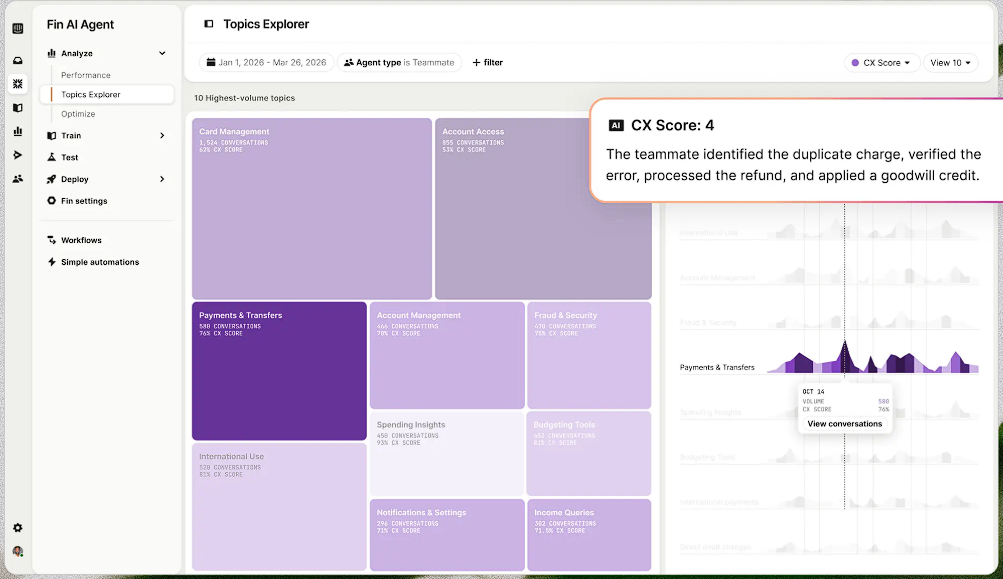
Intercom’s automation wins when you focus it on the repetitive 20–30% of issues that consume most support time:
- Password / login problems
- Billing and plan questions
- “Where do I find X?” navigation issues
- Simple account changes (email, seat count, invoices)
The realistic goal is not “replace humans.” It’s shorten the path to the right answer: either an instant self-serve response or a clean escalation to a human with context attached.
How to avoid bad automation
- Don’t hide humans. Always provide a clear path to “talk to a person.”
- Don’t over-prompt. Too many questions in the messenger increases abandonment.
- Keep answers specific. A generic bot reply feels like stonewalling.
Proactive Support (The Adoption Engine)
This is where Intercom can justify its cost. Proactive messaging lets you:
- Nudge new users to complete onboarding steps.
- Announce features to the right segment (not everyone).
- Intercept churn signals (e.g., failed setup) with help content.
Used well, proactive support reduces churn and increases activation. Used poorly, it becomes spam.
Pricing Reality Check (What Teams Miss)
Intercom can be one of the most expensive support tools in a stack, mostly because pricing tends to scale with your usage and the modules you enable. The operational takeaway is simple:
- Decide your support strategy first (email-only vs in-app messaging vs omnichannel).
- Define what “automation success” means (deflection rate, first response time, resolution time).
- Audit monthly: which automations are actually reducing load, and which are just noise.
Who Intercom Is Best For
- SaaS teams that want to unify chat + support + onboarding messaging.
- Products with complex onboarding where proactive guidance increases activation.
- Teams ready to invest in automation and knowledge design (not just tooling).
Who Should Avoid It
- Teams that want a simple shared inbox with minimal setup (Help Scout fits better).
- Large enterprise support orgs that need heavy omnichannel routing and strict controls (Zendesk fits better).
- Businesses that are not ready to own messaging strategy (otherwise it becomes expensive noise).
Final Verdict
Intercom is a premium choice, but it’s premium for a reason: it combines support with messaging and automation in a way that matches how modern SaaS works. If you commit to using it as a system—routing, tags, help content, and measured automation—it can reduce support load and improve retention. If you want “a nicer inbox,” it’s overkill.
Explore Intercom →