Last Updated: April 2026 | Reviewed by Alex Hunter, Senior SaaS Editor
Help Scout Review 2026: The Best Shared Inbox for Human Support?
Most helpdesks make customer support feel like a ticket factory. Help Scout takes the opposite stance: keep the workflow simple, keep the interface calm, and make every conversation feel like a real email exchange. If you run support for an agency, a SaaS with a small team, or a product that wins on customer happiness, Help Scout often hits the sweet spot between a Gmail-like inbox and a full enterprise helpdesk.
In this review, we focus on workflows (not feature checklists): how fast a new agent becomes productive, how easy it is to keep the inbox clean, and what happens once you scale beyond “a couple of people answering emails.”
Table of Contents
Quick Comparison: Help Scout vs Zendesk vs Intercom
| Tool | Best For | Complexity | Automation Depth | Ideal Team Size |
|---|---|---|---|---|
| Help Scout | Human, email-first support | Low | Medium | 1–25 agents |
| Zendesk | Omnichannel + enterprise scale | High | High | 10–500+ agents |
| Intercom | Messaging + proactive support | Medium | High (AI-first) | 5–100+ agents |
What Is Help Scout?
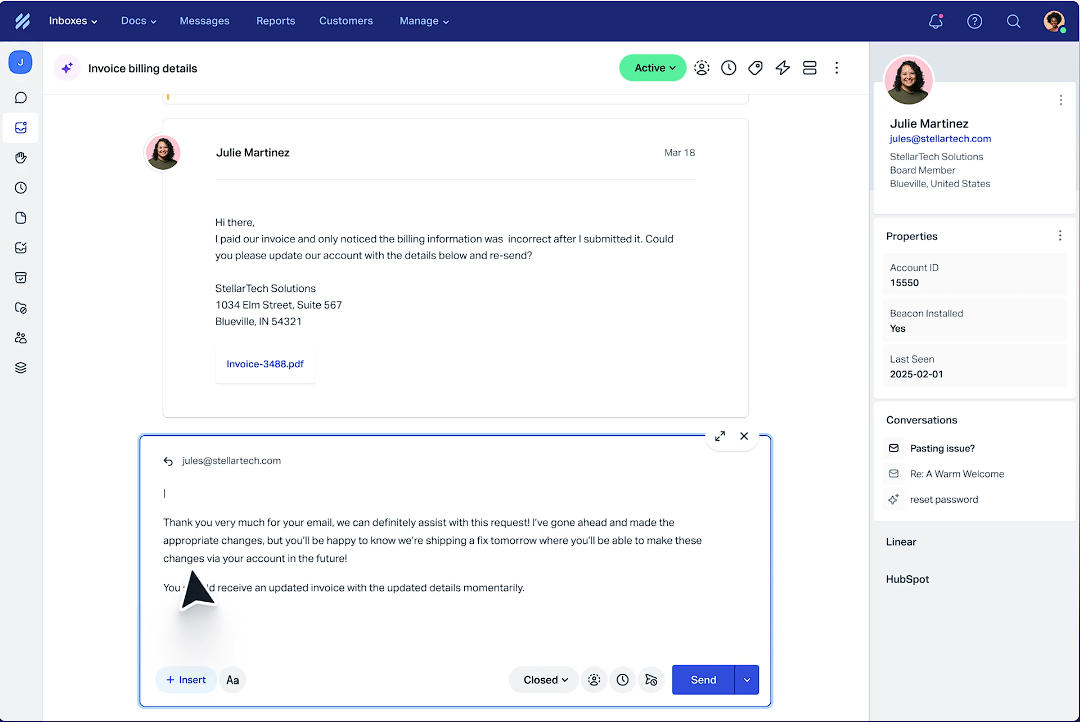
Help Scout is a customer support platform centered on a shared inbox. Customers email you (or message you via chat), and your team collaborates behind the scenes: assignments, internal notes, saved replies, tags, and workflows. Compared to traditional ticketing systems, Help Scout aims to feel less like a queue and more like a well-run support team using email—just with the collaboration layer that email lacks.
What “good” looks like in Help Scout
- Inbox discipline: every conversation has an owner, a status, and a next action.
- Fast replies: common questions are handled with saved replies and light automation.
- Self-serve deflection: Docs + Beacon reduce repetitive questions.
The Shared Inbox Workflow (What It Feels Like Day-to-Day)
The core workflow is deceptively simple:
- New conversation arrives (email, contact form, or chat).
- Triage (tag it, assign it, set a status).
- Resolve with a real answer, or collaborate via internal notes.
- Close and learn (reporting, saved replies updates, docs improvements).
Where Help Scout shines is clarity: the UI encourages a clean inbox with a clear owner. For small teams, this matters more than advanced features. If two people respond to the same customer once a month, that’s already enough damage to churn a good account.
Key Features That Matter in 2026
1) Collision detection & assignments
For teams used to plain email, the biggest improvement is not stepping on each other. Assignments make ownership explicit, and internal notes keep handoffs clean (“customer is angry about invoice,” “bug confirmed,” “waiting on engineering”).
2) Saved replies that don’t feel robotic
Saved replies are table stakes, but Help Scout’s editor makes it easy to keep them human. The best teams treat saved replies like a product: reviewed monthly, short, and written in your voice.
3) Workflows / rules (light automation)
Help Scout’s automation isn’t designed to replace an enterprise helpdesk; it’s designed to remove the obvious busywork:
- Auto-tag billing emails and route to the right person.
- Auto-close stale conversations after a defined period.
- Escalate certain keywords (“cancel”, “refund”, “security”) to senior agents.
4) Customer profiles & context
Support is faster when you can see who you’re talking to. Help Scout’s customer view helps agents answer with context (previous conversations, notes, custom fields, and associated companies depending on setup). For subscription businesses, that context prevents the most common support failure: giving a generic answer to a customer who is already frustrated.
Docs / Help Center: The Quiet Growth Lever
Most teams treat a help center as a “nice-to-have.” In practice, a well-run Docs setup is one of the highest ROI moves in support. The value is not SEO traffic—it’s deflection and faster resolution:
- Agents can link to a canonical answer instead of rewriting it.
- Customers can self-serve common questions without waiting.
- Docs becomes the source of truth for policies (refunds, limits, SLAs).
Help Scout’s Docs is intentionally simple. If you need heavy customization, you may outgrow it. But for most small businesses, simplicity is a feature: you will actually keep it updated.
Beacon: Chat + Help Widget (Used Correctly)
Chat can either reduce tickets or create chaos. Help Scout’s Beacon is strongest when you use it as a help-first widget:
- Show suggested Docs articles before the user messages you.
- Capture context (page URL, user email, app plan) so agents don’t ask obvious questions.
- Set expectations: office hours, response time, and when email is better.
If you run a product-led SaaS, Beacon can reduce “where do I click” questions. If you run a high-touch enterprise motion, you may prefer Intercom’s proactive messaging and segmentation features.
Reporting & Coaching
Support reporting isn’t about vanity charts. It’s about answering three operational questions:
- Are we responding fast enough? (first response time, backlog)
- Are we resolving efficiently? (time to close, reopens)
- What should we fix in product/docs? (top tags, repeat issues)
Help Scout’s reporting is strong enough for most SMB teams, and the UI encourages you to use it. That matters: the best support metrics are the ones you actually review every week.
Pricing & Hidden Costs
Help Scout’s pricing tends to be easier to understand than Intercom and less “enterprise stacked” than Zendesk. The real costs to think about are:
- Seats: do you need every teammate as a full agent, or can some be light collaborators?
- Volume: inbox cleanliness collapses when you double ticket volume without process.
- Deflection work: you’ll get the best ROI if someone owns Docs and saved replies.
Who Help Scout Is Best For
- Agencies and service businesses that support clients over email.
- SaaS teams that want a shared inbox first, chat second.
- Founders who want to run support without feeling buried in tooling.
- Teams that care about tone and customer experience as a differentiator.
Who Should Avoid It
- Large omnichannel operations with strict SLA and heavy routing requirements (Zendesk fits better).
- Teams that need advanced in-app messaging, segmentation, and proactive campaigns (Intercom fits better).
- Businesses that demand deep workflow automation and complex approval pipelines.
Final Verdict
Help Scout wins when your goal is clean, human support with minimal admin overhead. It’s a mature shared inbox that scales further than you’d think—as long as you run support like an operation (triage, tagging, knowledge base ownership) and not like a random mailbox.
Try Help Scout →